
Crosslist from Tilt to Depop — Automatically
Move your Tilt inventory to Depop in minutes. Titles, photos, price, brand, condition and size transfer automatically. Inventory stays in sync both ways.



- \n
- Tilt: UK/EU live-auction marketplace for fashion, streetwear and collectibles, with real active sellers in GB, IT, US, ES, PL, FR and AU.
- Depop: browsable, search-and-feed fixed-price marketplace with 7 million active buyers, 90% of them under 26.
- Fields that transfer automatically: title, description, brand, condition, images, price and size — FLUF re-uploads your photos to Tilt’s own image host and maps categories on both sides.
- Inventory sync: when the item sells on Tilt or on Depop, FLUF removes it from the other channel.
- What FLUF automates: connect once, then crosslist, sync stock and mark items sold from one dashboard — no re-uploading photos or re-typing listings by hand.
- Cost: plans from £9/month (Starter). There is no free plan — every new account gets a 7-day trial for £1 first.
\n
\n
\n
\n
\n
\n
\n
\n\n
 \n
\n\n\n
\n\n
Why crosslist from Tilt to Depop?
\n\n
Crosslisting from Tilt to Depop lets you sell the same piece two different ways: live, to a room of buyers bidding against each other in real time on Tilt, and static, to a buyer scrolling and searching days or weeks later on Depop. Tilt rewards drama and scarcity — a rare pair of trainers or a one-off vintage jacket can spike in a live auction the way it never would sitting in a static feed. Depop rewards patience and discovery — the same item found through search, hashtags or the algorithm months after it was first listed. Running both means you are not betting the sale on one selling mechanic.
\n\n
Tilt is a live-auction marketplace for fashion, streetwear and collectibles. Check seller availability in your country before connecting.
\n\n
Depop is a different shape of marketplace entirely. It runs globally, skews heavily toward Gen Z — 80% of Depop’s user base is Gen Z and 90% of active users are under 26 — and had roughly 7 million active buyers against 3 million+ active sellers and $1.07 billion in gross merchandise sales in 2025, up 36% year over year (Business of Apps, Depop Revenue and Usage Statistics). Where Tilt is a room full of people watching one item at a time, Depop is a feed of 68 million+ items that a buyer filters down to exactly what they want.
\n\n
Sellers who already run auction-style drops report the same pattern: the item that didn’t get a bidding war on stream can still be exactly what someone is searching for on a browsing platform later — a live audience and a search audience are different buyers, not the same buyer twice (Flippd, Whatnot and Live Selling). The same logic applies moving from Tilt to Depop: what doesn’t sell live still has a shot at a browse-and-search buyer, without you re-listing it by hand.
\n\n
Tilt itself leans into this live-community angle deliberately — it runs regular hosted events like its “Tilt Treasures” auction series, where sellers stream from real venues with DJ sets and themed drops rather than a plain camera-on-a-desk feed (Tilt, on its Series A). That’s a genuinely different discovery mechanic to Depop’s algorithmic feed and hashtag search, which is why the two pull in different buyers rather than competing for the same click.
\n\n
| Tilt | Depop | |
|---|---|---|
| Active buyers | Not publicly disclosed; seller base measured at 2,301 active sellers across GB/IT/US/ES/PL/FR/AU (15 Aug 2026) | ~7 million active buyers, 56 million+ registered users |
| Primary age range | Youth-skewing streetwear/vintage community, UK-led | 90% of active users under 26 |
| Top markets | GB, IT, US, ES, PL, FR, AU | Global (UK, US, Australia are largest) |
| Strongest categories | Fashion, streetwear, designer vintage, collectibles | Vintage, streetwear, y2k, everyday fashion resale |
| Seller fees | 2% + £0.50 per transaction, all-in (Tilt Seller Fees) | 0% selling fee in UK/US; 2.9% + £0.30 (UK) or 3.3% + $0.45 (US) payment processing; buyer pays a separate marketplace fee (Depop newsroom) |
| Listing format | Live-hosted auction rooms + off-stream fixed listings | Static, search- and feed-driven fixed-price listings |
\n\n
How to crosslist from Tilt to Depop with FLUF Connect
\n\n
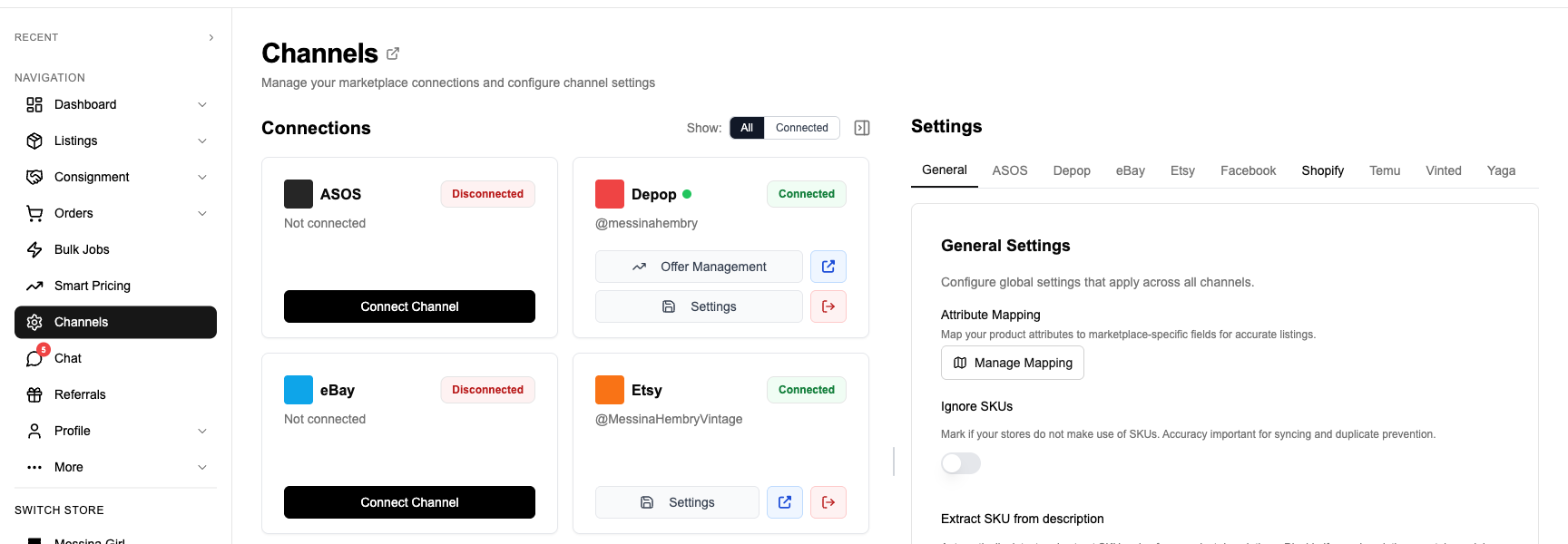
Use the browser extension once to connect Tilt, signing in with phone and SMS code, Apple or Google. Afterwards Tilt needs no open browser. Connect Depop directly in FLUF without an extension.
\n\n
- \n
- Sign up for FLUF Connect and open the Channels page in your dashboard.
- Use the extension once to connect Tilt. Sign in with phone and SMS code, Apple or Google when prompted.
- Connect your Depop account through its own webview login — no extension step needed for Depop.
- Import your Tilt listings into the FLUF dashboard, in bulk or one at a time.
- Review the field mapping — title, description, brand, condition, images, price and size are pre-filled from your Tilt listing.
- Select the items you want on Depop too and click crosslist.
- FLUF uploads your photos, submits the Depop listing, and links the two so stock stays in sync going forward.
\n
\n
\n
\n
\n
\n
\n
\n\n
Review your Tilt photos, category, condition and other details before publishing on Depop. Set auto-crosslisting rules by price, brand or category, or select a batch of items to crosslist together.
\n\n
What transfers from Tilt to Depop?
\n\n
This is the part that actually determines how much manual cleanup you’ll do after crosslisting. Tilt’s listing shape is unusual among the channels FLUF supports — price and stock quantity live on a SKU object rather than at the top level of the listing, and there is no dedicated SKU/reference-code field at all. Depop’s shape is closer to the FLUF norm. Here’s the field-by-field picture:
\n\n
| Tilt Field | Depop Field | Transfer Status | Notes |
|---|---|---|---|
| Name | Title | ✅ Automatic | Tilt titles are capped at 100 characters, comfortably inside Depop’s title field — nothing is cut going this direction. |
| Description | Description | ✅ Automatic | Carried across as-is. |
| Images (up to 20) | Images | ✅ Automatic | FLUF re-hosts the photos from Tilt’s own S3 bucket and uploads them to Depop — Tilt doesn’t expose plain image URLs, so this re-hosting step is what makes the transfer possible at all. |
| SKU price (salePrice) | Price | ✅ Automatic | Tilt prices live on the SKU object, not the listing itself; FLUF reads that value and sets Depop’s price to match. |
| Category (categoryIds) | Category | ⚡ Smart mapped | FLUF’s universal category mapper resolves the closest Depop category to your Tilt category — same mapper used for every channel pair, not a Tilt-specific guess. |
| Condition | Condition | ⚡ Mapped | Tilt and Depop use different condition scales; FLUF converts between them automatically. |
| Brand | Brand | ✅ Automatic | |
| Size (SKU variantValues) | Size | ✅ Automatic | Tilt stores size as a variant on the SKU rather than a top-level field; FLUF pulls it through regardless. |
| SKU quantity | Stock quantity | ✅ Automatic | |
| Shipping method | Shipping profile | ⚠️ Manual input | Tilt requires a shipping profile on the listing before it will accept it (managed shipping only covers GB/ES/IT — other Tilt sellers need a custom profile). Depop has its own separate shipping settings you’ll want to check independently. |
| — | SKU / reference code | ❌ Not available | Tilt has no SKU field on its listings, so this is empty unless you set one manually on Depop. |
\n
\n\n
Legend: ✅ Automatic — transfers with no action needed. ⚡ Smart mapped — FLUF converts between different value systems. ⚠️ Manual input — needs your attention. ❌ Not available — the field doesn’t exist on the source.
\n\n
Category mapping
\n\n
Tilt’s category tree is narrower and deeper into fashion and collectibles than Depop’s — think streetwear, designer vintage, sneakers and collectible drops rather than a general marketplace taxonomy. FLUF’s category mapper walks your Tilt category and finds the closest match in Depop’s own structure automatically, the same way it does for every other channel pair FLUF supports; you don’t need to manually re-categorise each item after crosslisting unless you want a more specific placement than the automatic match.
\n\n
Fields that need your attention
\n\n
Two things are worth checking before you crosslist at volume. First, shipping: Tilt only runs its own managed shipping in Great Britain, Spain and Italy — if you’re selling from the US, Poland, France or Australia, you need a custom shipping profile set up in Tilt before FLUF can create a listing there, and Depop’s shipping settings are entirely separate and worth confirming independently. Second, because Tilt has no SKU or reference-code field, if you rely on SKUs to track inventory across channels you’ll want to set one manually on the Depop side, or use FLUF’s own product ID as your cross-channel reference instead.
\n\n
How inventory sync works between Tilt and Depop
\n\n
The whole point of crosslisting is not selling the same physical item to two buyers. FLUF’s sync layer is what prevents that.
\n\n
| Event | What happens | Timing |
|---|---|---|
| Item sells on Tilt | Marked sold and removed from Depop | Within minutes |
| Item sells on Depop | Marked sold and delisted from Tilt | Within minutes |
| Price changed on Tilt | Edits made directly in either marketplace do not automatically update the other. Make shared changes in FLUF. | N/A |
| Item deleted on Tilt | Left active on Depop until you delist it manually | N/A |
| Item relisted on Tilt | No relisting automation on Tilt (see below) — Depop side is unaffected | N/A |
\n\n
When an item sells on Tilt, FLUF Connect marks it sold and removes it from Depop (and any other connected channel) within minutes. The same happens in reverse when it sells on Depop first. You don’t have to log into two apps and manually cross off what’s gone.
\n
\n\n
Review Tilt order values before using them for accounting. Sold-item removal is supported, but Tilt order values still need checking. Depop order sync also supports refunds and fulfilment tracking.
\n\n
Before and after FLUF Connect
\n\n
Without FLUF Connect (manual crosslisting)
\n\n
- \n
- Open Tilt, find the listing you want to also sell on Depop
- Screenshot or download each photo (Tilt doesn’t give you a simple image link to copy)
- Open Depop, start a new listing
- Re-upload every photo one by one
- Retype the title, trimmed or expanded to fit Depop’s format
- Re-enter the category using Depop’s own taxonomy
- Re-enter condition on Depop’s scale
- Set the price, remembering Depop’s own fee structure is different from Tilt’s
- Publish
- Note somewhere which items are now listed on both channels
- When it sells on either one, manually go delist it on the other
\n
\n
\n
\n
\n
\n
\n
\n
\n
\n
\n
\n\n
Time per item: roughly 8–12 minutes, more if the photos need re-editing for Depop’s aspect ratio — Tilt’s live-room images are often shot square-on for the stream layout and can need a re-crop before they sit well in Depop’s feed format.
\n\n
With FLUF Connect
\n\n
- \n
- Select the Tilt items you want on Depop in the FLUF dashboard
- Click “Crosslist to Depop”
- Review the pre-mapped fields
- Confirm
- Done — stock stays in sync automatically from here
\n
\n
\n
\n
\n
\n\n
Manual: roughly 13–20 hours. With FLUF Connect: well under an hour of review time. That’s most of a working week back for sourcing, photographing and running your next Tilt drop.
\n
\n\n
Automation features for Tilt and Depop sellers
\n\n
Automation on this pair is asymmetric, and it’s worth knowing that before you build a workflow around it. Depop is one of FLUF’s most fully-featured channels — auto-relisting, offer management, refunds and fulfilment tracking are all wired. Tilt, currently supports crosslisting, inventory sync and mark-as-sold — relisting and offer management are not yet available on Tilt through FLUF.
\n\n
| Feature | Tilt | Depop |
|---|---|---|
| Crosslisting | ✅ | ✅ |
| Auto-relisting | ❌ | ✅ |
| Offer management | ❌ | ✅ |
| Inventory sync | ✅ | ✅ |
| Order sync | Order values require review. | ✅ |
| Mark as sold | ✅ | ✅ |
| Bulk operations | ✅ | ✅ |
\n\n
In practice this means: run your Tilt side for what it’s good at — live drops, auction excitement, scarcity — and lean on Depop’s offer management and auto-relisting to keep the fixed-price side working while you’re not actively managing it. Bulk crosslisting and auto-crosslisting rules (by category, brand or price threshold) work across both channels, so new inventory can flow from Tilt into Depop without a manual review step if you set the rule up once.
\n\n
Bulk operations across Tilt and Depop
\n\n
If you’re moving a whole Tilt wardrobe onto Depop at once rather than item by item, FLUF’s bulk tools apply the same field mapping, category resolution and image re-hosting across every selected listing in one pass — the same process described above, just run at scale. A find-and-replace on titles or descriptions, or a bulk price adjustment, applies across both connected channels rather than requiring you to edit each platform separately.
\n\n
How much does it cost to crosslist from Tilt to Depop?
\n\n
Every FLUF Connect plan includes crosslisting, inventory sync, and mark-as-sold across all supported channels — automation isn’t a paid add-on you bolt on later, it’s included from Seller upwards. There is no free plan, but every new account starts with a 7-day trial for £1 before you’re asked to choose one.
\n\n
| Plan | Price | Products | Includes |
|---|---|---|---|
| Starter | £9/month | 300 | All automation features, all supported channels |
| Growth | £19/month | 1,000 | All automation features, all supported channels |
| Seller | £49/month | 2,500 | All automation features, all supported channels |
| Pro | £99/month | 5,000 | All automation features, priority sync |
\n\n
Plans aren’t scoped to a single channel pair — connecting Tilt and Depop uses the same plan as connecting every other marketplace FLUF supports. See the full breakdown on the pricing page.
\n\n
Sources and verification
\n\n
- \n \n
- Tilt seller fees (2% + £0.50 per transaction): Tilt Help Desk — Seller Fees.
- Tilt overview and positioning as a UK/EU live-auction fashion and collectibles marketplace: tilt.app.
- Depop fee structure (0% UK/US selling fee, payment processing, buyer marketplace fee): Depop newsroom — Evolving our fee structure and Depop — Sell.
- Depop active buyers, registered users, GMS and Gen Z demographic data: Business of Apps — Depop Revenue and Usage Statistics (2026).
- Hybrid live-auction + fixed-price selling strategy discussion: Flippd — Whatnot and Live Selling: How Resellers Are Moving Inventory Faster in 2026.
\n
\n
\n
\n
\n
\n\n
Ready to run Tilt and Depop from one dashboard?
\n\n
Already selling on Tilt or Depop and want to see how a similar pair works? Crosslist from Whatnot to Depop covers the equivalent US-market live-auction pairing, or browse the full crosslisting hub for every channel pair FLUF supports. You can also read the dedicated guides for selling on Tilt and selling on Depop before you connect either account.
\n\n
Running Tilt alongside Depop? See how the same stock performs on other pairings: Crosslist Tilt to Whatnot, Crosslist Tilt to Vinted, or read Tilt vs Whatnot compared to decide which live-auction channel suits your stock best.
\n\n\n
Related guides
\n
Frequently Asked Questions
FLUF Connect plans start at £9/month (Starter). There is no free plan, but every new account gets a 7-day trial for £1 first. Every plan includes crosslisting, inventory sync and mark-as-sold across all supported channels, including Tilt and Depop — automation is included from Pro upwards, not a paid add-on.
Yes. FLUF Connect keeps stock in sync between Tilt and Depop after you crosslist an item, so the same piece never sells twice.
Yes. When an item sells on Tilt, FLUF marks it sold and delists it from Depop (and any other connected channel) within minutes, so you never have to manually cross it off elsewhere.
Yes. Sales remove matching listings in both directions. Review Tilt order values before using them for accounting; the exact amount may need checking.
Use the FLUF browser extension once to connect Tilt. Sign in with phone and SMS code, Apple or Google. No open browser is needed afterwards.
Use the extension once to connect Tilt. Afterwards no open browser is needed for Tilt. Depop connects directly in FLUF and does not need an extension.
Not yet. Tilt currently supports crosslisting, inventory sync and mark-as-sold through FLUF Connect, but auto-relisting and offer management — both of which work on Depop — aren't available on Tilt.
Tilt has real, measurable seller activity in Great Britain, Italy, the United States, Spain, Poland, France and Australia. Managed shipping through Tilt itself only covers Great Britain, Spain and Italy — sellers in the other four countries need a custom shipping profile set up in their Tilt account before crosslisting.
Sign up for free
Join the community
You're in.
Open your dashboard