
Crosslist from Designer Wardrobe to Marktplaats
List your curated AU/NZ designer fashion in front of 8 million-plus Dutch buyers on Marktplaats — one catalogue, two hemispheres, automatic sync.



- Designer Wardrobe is a curated pre-loved designer and contemporary fashion marketplace with roughly 350,000 members across New Zealand and Australia and about NZ$1.6m in transactions a month (source). Marktplaats is the Netherlands’ dominant general classifieds site, with more than 8 million unique monthly visitors and around 18.7 million live ads (source).
- This is a reach play: you take curated Southern-Hemisphere designer stock (priced in AUD/NZD) and put it in front of a huge Dutch buyer base priced in EUR — a completely different currency, fee structure and audience.
- The fee direction flips. On Designer Wardrobe the seller pays the success fee (12.95% above A$/NZ$40, or a flat $4.95 below it) (source). On Marktplaats with “Direct Kopen” the seller pays no commission — the buyer pays a 5% protection fee plus roughly €0.40 per transaction (source).
- Title, description, images, price, quantity and SKU carry across from Designer Wardrobe to Marktplaats automatically — you write the listing once.
- Both channels support order sync and mark-as-sold, so a sale on either side removes the item from the other automatically. Marktplaats also supports automated relisting to keep ageing stock visible.
- FLUF Connect crosslists your whole catalogue from one dashboard. Plans start from £9/month (Starter). There is no free plan, and automation is included from Seller upwards.
Why sell on both Designer Wardrobe and Marktplaats
Most crosslisting guides pair two marketplaces that share a country and a currency. This one deliberately does not. FLUF Connect makes it practical to list the same curated wardrobe on Designer Wardrobe in Australia and New Zealand and on Marktplaats in the Netherlands at the same time — two audiences that would otherwise never see each other’s inventory. If you already build clean, well-photographed designer listings for the Tasman market, you are sitting on assets that a market of 17 million Dutch buyers has never had access to. The only thing standing between your stock and that audience is the labour of re-listing it, and that is exactly the labour a crosslister removes.
Designer Wardrobe is a focused, curated proposition. Founded in Auckland in 2014, it has grown into a community of roughly 350,000 members spanning New Zealand and Australia, moving about NZ$1.6m in transactions every month (source). It skews women’s designer, contemporary and premium high-street fashion, with buyer protection and active community moderation keeping the quality bar high (source). Sellers there report items are “up to six times more likely to sell”, with most selling within three days and the average seller earning around NZ$126 a month (source). It is a strong home base — but it is also, by design, a regional one. Designer Wardrobe operates on NZD on its.co.nz site and AUD on its Australian site, and it does not sell globally.
Marktplaats is the opposite kind of marketplace: horizontal, enormous and local to a single country. It has been the default place Dutch consumers buy and sell second-hand since 1999, and today it draws more than 8 million unique visitors a month, sees around 350,000 new ads posted daily, and carries roughly 18.7 million live ads at any time — used by about 40% of Dutch adults (source). It was owned by eBay, moved to Adevinta in 2021, and passed to Permira and Blackstone in 2024 (source). Its heartland is bulky local-pickup goods — cars and parts, furniture, home and garden, electronics — but fashion is a real and growing category on the platform, and second-hand designer pieces stand out against a backdrop dominated by everyday goods.
That contrast is the whole point. A curated designer coat that competes hard against thousands of similar listings on a fashion-first marketplace can look like a genuine find on a general classifieds site where most of the fashion is high-street and casual. You are not just adding volume by listing on both; you are changing the competitive context your item appears in. The Southern-Hemisphere seasonal calendar adds another quiet advantage — your end-of-season stock in one hemisphere can be arriving in front of buyers heading into the opposite season on the other side of the world.
There is a demand-side reason too. Designer Wardrobe buyers are actively hunting labels; that is what brings them to the platform. Marktplaats buyers are browsing a firehose of general listings, so the ones who search for a specific brand or size are high-intent and lightly contested. Listing the same item in both places means one is your reliable, fast-moving channel and the other is your reach channel — and neither costs you anything extra to keep populated once the crosslisting is set up.
The honest caveat is geography and logistics. Marktplaats buyers skew strongly local, its payments run on Dutch rails like iDEAL, and shipping is built around PostNL and DHL within the Netherlands (source). Selling a Tasman-sourced item to a Dutch buyer means you need to be willing and able to ship internationally, price the item in EUR, and accept that fulfilment takes longer than a domestic Designer Wardrobe sale. This is a reach strategy for sellers who want incremental EUR revenue from stock that would otherwise only ever be seen in Australia and New Zealand — not a replacement for your home market.
How to crosslist from Designer Wardrobe to Marktplaats
The mechanics are straightforward once your catalogue lives in one place. FLUF Connect treats your inventory as a single source of truth and pushes each item out to the channels you enable, so “crosslisting from Designer Wardrobe to Marktplaats” really means “list the item once in FLUF and switch Marktplaats on”.
Here is the path from a standing start:
- Create your FLUF Connect account and install the extension. Sign up at fluf.io and add the FLUF browser extension. The extension is what lets FLUF act on your behalf inside marketplaces that don’t offer a full public listing API, which matters for a classifieds platform like Marktplaats.
- Connect Designer Wardrobe as your source. Link your Designer Wardrobe account so FLUF can read your existing listings — titles, descriptions, photos, prices and quantities — and pull them into your central catalogue. If you are starting fresh you can also build items directly in FLUF and treat Designer Wardrobe as one of the outputs instead.
- Connect Marktplaats as a destination. Authorise the Marktplaats channel from the FLUF dashboard. Once connected, Marktplaats becomes a toggle on each product, exactly like every other channel.
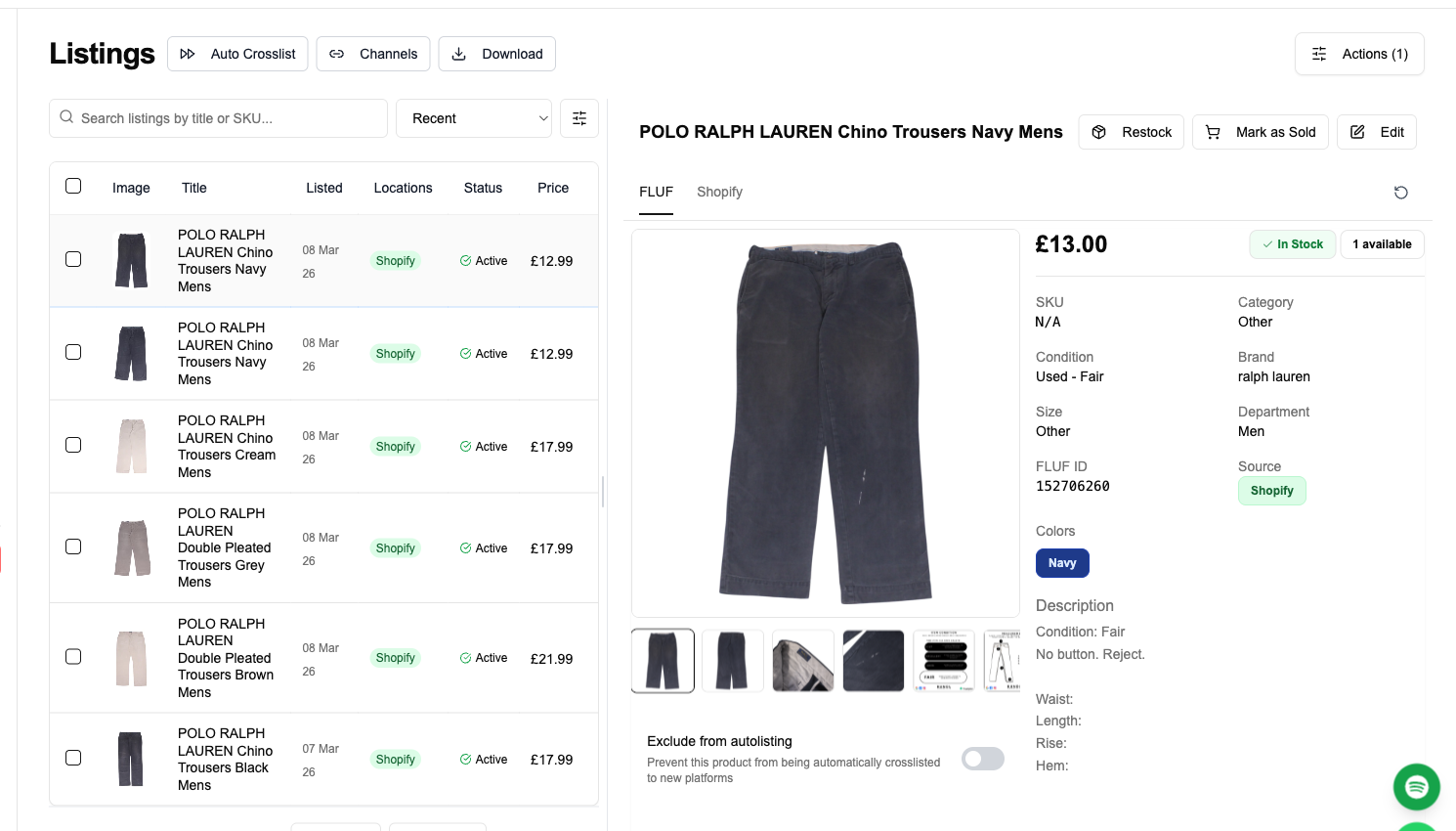
- Import and review your catalogue. FLUF brings your Designer Wardrobe items into the listings view (shown above). Check that photos, descriptions and prices imported cleanly before you push anything live.
- Set your EUR pricing. This is the step that is specific to this pair. Because Designer Wardrobe prices in AUD/NZD and Marktplaats prices in EUR, decide your euro price deliberately rather than letting a raw conversion decide for you. Factor in international shipping, the fact that Marktplaats buyers pay their own 5% protection fee on top of your price, and what the item would realistically fetch against Dutch comparables.
- Choose your Marktplaats selling mode. Decide whether to use “Direct Kopen” (Buy Now, which carries the buyer-side protection fee and enables integrated shipping) or a standard classifieds ad. Direct Kopen is what makes order sync and mark-as-sold behave cleanly, so it is the natural choice when you are crosslisting.
- Push live and monitor. Enable Marktplaats on the products you want to reach Dutch buyers, publish, and watch orders flow back into the same dashboard. From here the automation does the ongoing work.
The important shift in mindset is that you are not managing two separate storefronts. You are managing one catalogue with two audiences attached to it. Every edit you make to an item’s title, description or photos in FLUF can be pushed to both channels, so there is no drift between your Designer Wardrobe listing and your Marktplaats listing unless you deliberately want them to differ.
What transfers — fields & categories
FLUF Connect maps the core listing fields from your source catalogue onto each destination’s own structure. For the Designer Wardrobe to Marktplaats route, the fields that carry across reliably are title, description, images, price, quantity and SKU — the essentials that make up a complete listing on both platforms.
| Field | Designer Wardrobe (source) | Marktplaats (destination) | Notes |
|---|---|---|---|
| Title | Yes | Yes | Transfers directly; keep it brand- and model-led so Dutch keyword searches surface it. |
| Description | Yes | Yes | Carries across as written. Many Marktplaats buyers browse in Dutch, so consider adding a short Dutch summary for reach. |
| Images | Yes | Yes | Your photos are your biggest asset — the same clean shots that sell on Designer Wardrobe stand out against general classifieds imagery. |
| Price | Yes (AUD/NZD) | Yes (EUR) | Set the EUR figure deliberately; do not rely on a raw currency conversion of your Tasman price. |
| Quantity | Yes | Yes | Stock levels are tracked and kept consistent across both channels. |
| SKU | Yes | Yes | Your SKU travels with the item, which is what lets order sync match a sale back to the right product. |
| Category | Fashion-native taxonomy | General/horizontal taxonomy | Marktplaats is a general marketplace, so fashion sits alongside cars, furniture and electronics — FLUF maps your item into the closest fashion category. |
The category difference is worth dwelling on. Designer Wardrobe is a fashion-only marketplace, so its taxonomy is deep and specific to clothing, shoes and accessories. Marktplaats is horizontal — its categories span cars and parts, home and garden, electronics, baby and kids, DIY and tools, and fashion (source). That means a designer piece will not enjoy the same fine-grained filtering it gets on Designer Wardrobe, but it also means less direct fashion competition inside any given category page. Lean into brand, size and material in your title and description so that buyers using search — rather than category browsing — can find you.
Attributes such as brand, size, category and condition transfer wherever the destination exposes a field for them. Because Marktplaats is classifieds-first rather than a structured fashion catalogue, the free-text title and description do a lot of the work that a structured size or brand field would do on a dedicated fashion platform. Writing a descriptive, keyword-rich listing is therefore not optional here — it is how your item gets discovered.
What syncs and what doesn’t
This is where the Designer Wardrobe to Marktplaats pairing is genuinely comfortable, because both channels support the sync features that matter most. Here is the accurate picture, using the real capabilities of each channel rather than a generic promise.
Order sync and mark-as-sold work on both sides. Designer Wardrobe supports order sync and mark-as-sold, and Marktplaats supports order sync and mark-as-sold as well. In practice that means when an item sells on Designer Wardrobe, FLUF registers the sale and automatically removes the listing from Marktplaats — and when an item sells on Marktplaats, FLUF removes it from Designer Wardrobe. You do not have to race to a second tab to pull down the duplicate before someone else buys it. This two-way protection against overselling is the single most valuable thing about crosslisting a one-of-a-kind item, and on this pair it is fully automatic in both directions.
Relisting is available on Marktplaats. Marktplaats supports automated relisting, which is useful on a firehose classifieds site where older ads sink out of view as hundreds of thousands of new ones are posted every day. FLUF can refresh eligible Marktplaats listings to keep your stock visible. Designer Wardrobe does not offer relisting, so on the Designer Wardrobe side your listing stays put as originally posted — there is no automatic bump to fire there, which is fine given its curated, fashion-focused browse experience.
Offers are not part of this pair’s automation. Neither Designer Wardrobe nor Marktplaats exposes an offers/negotiation capability through FLUF, so any price negotiation you do happens natively on the platform, not through the crosslister. If a Marktplaats buyer messages to haggle, you handle that conversation on Marktplaats directly.
| Capability | Designer Wardrobe | Marktplaats |
|---|---|---|
| Order sync | Yes | Yes |
| Mark-as-sold (auto delist on sale) | Yes | Yes |
| Automated relisting | No | Yes |
| Offers via FLUF | No | No |
The bottom line: because both marketplaces support order sync and mark-as-sold, the classic crosslisting nightmare — selling the same unique item twice — is handled for you in both directions on this route. You keep one accurate stock count, and a sale anywhere clears the item everywhere. That is exactly the reassurance you want before you start pointing curated designer stock at a market on the other side of the planet.
Your workflow, before & after
It helps to see what actually changes day to day, because the value of a crosslister is measured in the minutes it removes from your routine.
Before FLUF Connect. Your listings live inside Designer Wardrobe. To reach Dutch buyers you would open Marktplaats, create a fresh ad from scratch, re-upload every photo, retype the title and description, translate or at least adapt the copy, work out a sensible EUR price by hand, and set up shipping. Then you would repeat that for every item. Worse, you would carry the ongoing risk that a Designer Wardrobe sale leaves a live Marktplaats ad still selling the same physical garment — so you would be manually policing both platforms every time something sold, and refunding an embarrassed Dutch buyer whenever you were too slow. For a wardrobe of any size this is hours of duplicate data entry plus a permanent low-grade anxiety about overselling.
After FLUF Connect. You build the item once. The title, description, images, price, quantity and SKU flow to Marktplaats automatically; you set the EUR price once and choose Direct Kopen. From then on, orders from both channels arrive in a single dashboard, stock stays consistent, and a sale on either side auto-delists the other. Marktplaats relisting keeps your ageing ads fresh without you touching them. Your daily job shrinks to photographing new stock, writing one good listing, and packing whatever sells. The reach to the Netherlands becomes essentially free labour once the initial setup is done — you are no longer choosing between “list it on Marktplaats too” and “save myself the hour”, because the hour is gone.
The seasonal angle is worth building into the after-state deliberately. Because Designer Wardrobe operates on a Southern-Hemisphere calendar and Marktplaats on a Northern-Hemisphere one, your winter coats going quiet on the Tasman as spring arrives are landing in front of Dutch buyers heading into autumn. A crosslister lets you exploit that offset passively: the same listing simply keeps working for a different set of buyers at a different point in their year.
Automation & bulk tools
Automation is where crosslisting stops being a data-entry chore and starts being leverage, and on FLUF Connect it is included from Seller upwards rather than sold as a paid add-on.
For this pair, the automation that earns its keep is the two-way order sync and mark-as-sold described above — the safety net that lets you list one-off designer pieces across two hemispheres without fear of double-selling. On top of that, Marktplaats relisting runs automatically to keep your ads from sinking in a market that adds roughly 350,000 new listings a day (source). Without relisting, a fashion item on Marktplaats would be buried under a mountain of general-goods ads within days; with it, your stock stays surfaced.
The bulk tools matter most at the moment of expansion. If you already have a populated Designer Wardrobe wardrobe, you do not want to push items to Marktplaats one at a time. FLUF’s bulk actions let you select a batch, apply a pricing rule, and publish to Marktplaats en masse, so bringing a hundred existing listings to a new market is a single afternoon’s work rather than a hundred separate ones. Bulk editing also lets you append a short Dutch-language summary or a shipping note across many listings at once — useful when you are adapting Tasman-written copy for a Dutch audience.
Inventory sync underpins all of it. FLUF keeps a single quantity for each item and reconciles it across every connected channel, so the number a Marktplaats buyer sees is the same number your Designer Wardrobe listing reflects. That shared stock count is what makes it safe to run genuinely one-of-a-kind fashion across two marketplaces at once.
Pricing
FLUF Connect plans start at £9/month (Starter). There is no free plan, but every new account gets a 7-day trial for £1. Inventory sync, order sync, relisting where the channel supports it, and the bulk tools are all included on every plan — automation is part of the product, not a paid extra.
It is worth separating FLUF’s subscription from the marketplaces’ own fee structures, because the fee direction is one of the most distinctive things about this particular pair. On Designer Wardrobe, the seller carries the cost: listing is free, but the success fee is a flat A$/NZ$4.95 on items under $40 and 12.95% of the final value (item plus shipping) above that, capped at $249, with additional payment-processing fees depending on how the buyer pays (source, source). On Marktplaats with Direct Kopen the model inverts: the seller pays no commission, and it is the buyer who pays a 5% buyer-protection fee plus roughly €0.40 per transaction, with the seller’s payout landing about seven days after shipping (source, source). Basic private classifieds ads on Marktplaats are free to post, with optional paid visibility upsells if you want a listing boosted (source).
What that means in practice: a NZ$100 designer item selling on Designer Wardrobe gives up roughly 12.95% plus payment fees before you see your payout, whereas the euro-equivalent sale on Marktplaats via Direct Kopen leaves your headline price intact for you and pushes the protection cost onto the buyer. That flip is a good reason to price your Marktplaats listing on its own merits rather than mechanically converting your Tasman price — the net you keep behaves differently on each side, and one platform monetises the seller while the other monetises the buyer. The Marktplaats buyer-protection model has drawn some criticism from users, particularly around how missing-package disputes are resolved, so it is worth understanding before you lean on it heavily (source).
The FLUF subscription pays for itself the moment crosslisting saves you more time (or captures more sales) than £19 a month is worth. For a seller with a stocked Designer Wardrobe wardrobe eyeing a market of 8 million-plus Dutch buyers, that threshold is low.
Sources & verification
The figures and fee details on this page come from the following primary and reference sources:
- Designer Wardrobe fees (success fee, flat fee, cap) — help.designerwardrobe.co.nz/article/44-dw-fees
- Designer Wardrobe payment/card fees — help.designerwardrobe.co.nz/article/189-card-payment-fee
- Designer Wardrobe how it works / categories — help.designerwardrobe.co.nz/article/58-how-it-works
- Designer Wardrobe members & monthly transactions — oceanroadmagazine.com.au and ragtrader.com.au
- Designer Wardrobe seller performance (6x, 3 days, ~$126/month) — nzentrepreneur.co.nz
- Marktplaats audience (8M+ monthly visitors, ~350k ads/day, ~18.7M live ads, ~40% of Dutch adults) & categories — onlineklik.nl
- Marktplaats advertising tariffs (free basic ads, paid upsells) — marktplaats.nl advertentietarieven
- Marktplaats Direct Kopen costs (no seller commission) — help.marktplaats.nl kosten-direct-kopen
- Marktplaats buyer protection (5% + ~€0.40) — help.marktplaats.nl kosten-kopersbescherming
- Marktplaats shipping (PostNL/DHL, iDEAL) — marktplaats.nl/i/verzenden
- Marktplaats ownership history (eBay → Adevinta → Permira/Blackstone) — ebayinc.com
- Marktplaats buyer-protection sentiment — trustpilot.com/review/www.marktplaats.nl
Frequently Asked Questions
Yes. FLUF Connect keeps one catalogue and pushes your items to both channels, so the same listing reaches Designer Wardrobe buyers in Australia and New Zealand and Marktplaats buyers in the Netherlands simultaneously. Title, description, images, price, quantity and SKU transfer across automatically.
No. Both Designer Wardrobe and Marktplaats support order sync and mark-as-sold, so a sale on either side automatically removes the item from the other. You keep one accurate stock count and the classic double-sell risk is handled in both directions.
Designer Wardrobe prices in AUD/NZD and Marktplaats prices in EUR. Set your euro price deliberately in FLUF rather than relying on a raw conversion — factor in international shipping and that Marktplaats buyers pay their own 5% protection fee on top of your price.
The fee direction flips. On Designer Wardrobe the seller pays the success fee (a flat A$/NZ$4.95 under $40, or 12.95% of final value above it, capped at $249). On Marktplaats with Direct Kopen the seller pays no commission — the buyer pays a 5% protection fee plus about €0.40 per transaction.
Yes. Marktplaats supports automated relisting, so FLUF can refresh eligible ads to keep your fashion listings visible on a site that adds roughly 350,000 new ads a day. Designer Wardrobe does not offer relisting, so your listing there stays as originally posted.
Title, description, images, price, quantity and SKU carry across, plus brand, size, category and condition where Marktplaats exposes a field for them. Because Marktplaats is a general classifieds site, a keyword-rich title and description do a lot of the discovery work.
It's a reach play. Marktplaats buyers skew local and shipping runs on PostNL/DHL within the Netherlands, so you need to ship internationally and accept longer fulfilment. But it puts curated designer stock in front of 8 million-plus monthly Dutch visitors it would otherwise never reach — incremental EUR revenue for little added effort once set up.
Plans start at £9/month (Starter). There is no free plan, but every new account gets a 7-day trial for £1. Inventory sync, order sync, relisting where supported, and bulk tools are included on every plan — automation is part of the product, not a paid add-on.
Sign up for free
Join the community
You're in.
Open your dashboard