
How to Switch Crosslisting Tools Without Losing Your Listings
Your listings do not live inside a crosslisting tool. That makes switching far easier than sellers expect — provided you avoid the one thing that can genuinely go wrong.



- There is nothing to migrate. Your listings do not live inside a crosslisting tool. They live on eBay, Depop, Etsy, Vinted and the rest — the tool is a control panel sitting on top of accounts you already own.
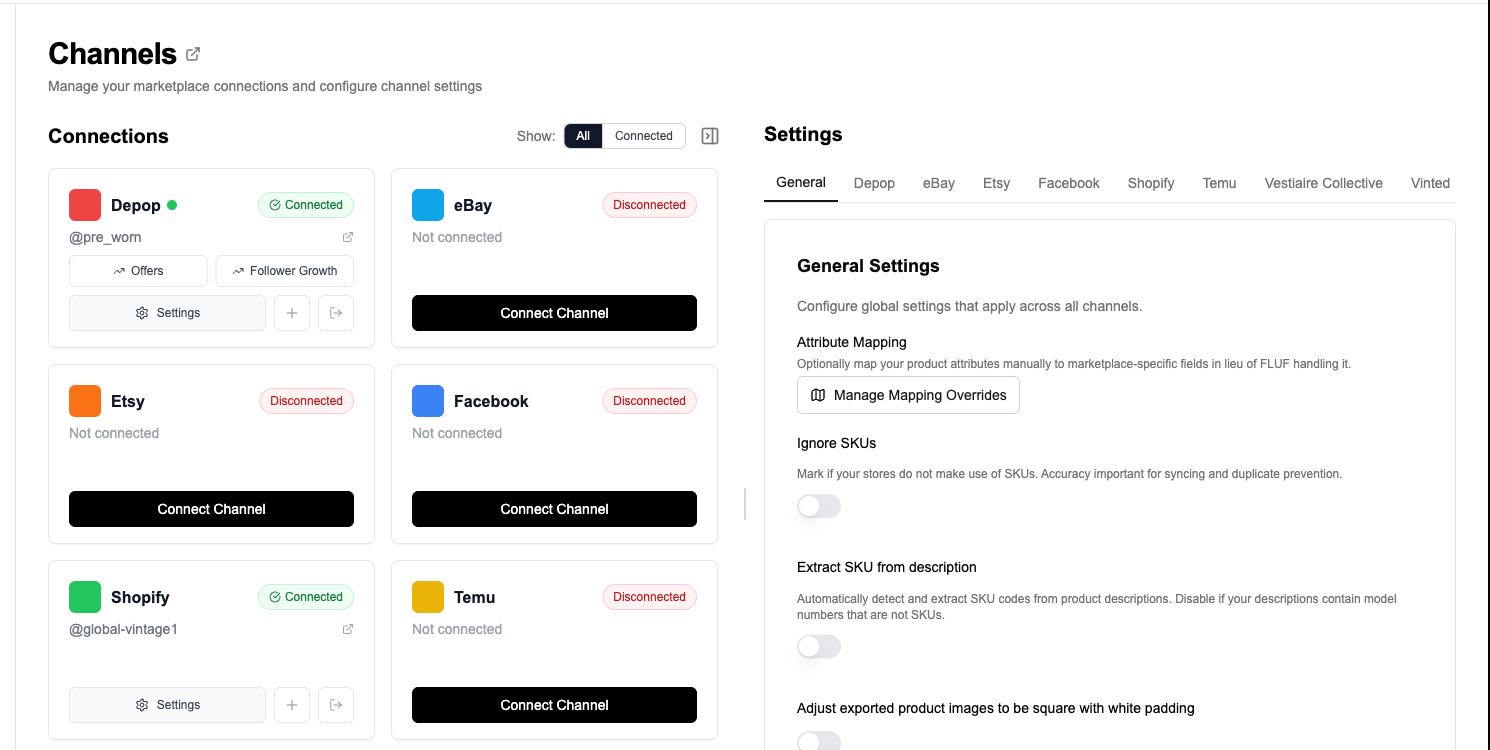
- So switching is a reconnection, not a data migration. You connect the same marketplace accounts to the new tool and your live listings are read in.
- This means a bad export cannot trap you. If your current tool has no export, or a poor one, it does not matter — you are not exporting anything.
- The one real risk is overlap: two tools relisting the same items against each other. Turn automation off in the old tool before turning it on in the new one.
- Run both for a short overlap rather than cancelling on day one. It costs one month and removes all the risk.
- Sellers most often switch for: Vinted support, automation being included rather than sold as add-ons, and per-seat or per-listing pricing that stops making sense as they grow.
Why switching crosslisting tools is easier than it sounds
Most software migrations are painful because the data lives inside the software. Move CRM and you have to move every contact. Move accounting and you have to move every transaction. Sellers reasonably assume crosslisting works the same way, and stay on a tool they have outgrown because the migration looks expensive.
It does not work that way. A crosslisting tool does not own your listings. Your listings are on the marketplaces — an eBay listing is an eBay object, a Depop listing is a Depop object — and the tool is a control panel that talks to those accounts on your behalf. Take the tool away and every listing you have is still live and still selling.
The consequence is that switching is a reconnection. You connect the same marketplace accounts to the new tool, it reads what is already live in them, and you carry on. Nothing is exported, nothing is mapped, and nothing is at risk of being lost in transit, because nothing is in transit.
What this means practically
| The usual migration worry | Whether it applies here |
|---|---|
| “Can I export my data from my current tool?” | Does not matter. You are not exporting anything. |
| “Will my photos come across?” | They are read from your live marketplace listings, where they already are. |
| “Will I lose my listings during the switch?” | No. Your listings stay live on the marketplaces throughout. Neither tool has to take anything down. |
| “Will my sales history transfer?” | No — and it does not on any tool. Order history belongs to the marketplace. A new tool tracks orders from the point you connect onwards. |
| “How long will it take?” | As long as connecting your accounts, plus the time to read your catalogue in. Large catalogues fill in progressively. |
| “Do I have to stop selling?” | No. There is no cutover moment. |
The one thing that can genuinely go wrong
There is a single real hazard in switching, and it is worth stating plainly because it is easy to avoid and unpleasant if you do not.
Two tools automating the same listings at once. If your old tool is still relisting, refreshing or managing offers on an account while the new one starts doing the same, they will act against each other. In the best case you waste actions. In the worse cases you get duplicate listings, items taken down and re-created repeatedly, or a marketplace treating the pattern as suspicious activity on your account.
The fix is a sequence, not a feature:
- Turn off automation in the old tool first — relisting, refreshing, auto-offers, scheduled bumps. Leave the tool connected but idle.
- Connect your accounts to the new tool and let your catalogue read in.
- Check the catalogue looks right before enabling anything automatic.
- Turn automation on in the new tool, one feature at a time rather than all at once.
- Then cancel the old subscription — last, not first.
Cancelling first is the mistake people make, usually to avoid paying twice. Paying for one extra month is the cheapest insurance available on a catalogue that is your actual income.
Why sellers switch
In our experience three reasons come up far more than any others.
Vinted. Several established crosslisting tools do not support Vinted at all, which is a serious gap for any European seller given how much second-hand fashion volume sits there. Sellers who start on a US-built tool frequently outgrow it for this reason alone.
Automation sold as add-ons. A subscription price that looks competitive stops looking that way once relisting and offer management are billed separately on top, which is a common structure. Comparing sticker prices without comparing what is included is how sellers end up paying two or three times what they expected. FLUF Connect includes bulk operations in every plan, and relisting and offer management from Seller upwards, with no per-feature fees — see features.
Pricing that does not scale with the business. Tools priced per listing action, per crosslist or per seat get more expensive exactly as you grow, which punishes the outcome you were paying for. Limits based on active products behave more predictably, because sold items stop counting.
None of that means your current tool is bad. If it does what you need at a price you are happy with, switching is not worth your time. The point of this page is that the migration cost — the thing usually keeping people put — is close to zero.
Switching from a specific tool
The process above is the same whichever tool you are leaving. We keep an honest head-to-head for each of the main ones, including where the other tool is genuinely better:
- List Perfectly
- Vendoo
- Crosslist
- Zipsale
- NiftyAI
- Flyp
- Sellbrite
- SellerAider
- Crosslisting.com
- Crosslist Magic
- SellRaze
The full set is on the comparison hub.
What if my stock is not listed anywhere?
Then there is nothing for any tool to read, and reconnection does not apply. That is the one case where you do need a file: you upload a CSV, an Excel file or a Google Sheet and the products are created from it. See importing from a spreadsheet.
Most sellers switching tools are in the opposite position — everything is already live somewhere — which is why the file route is the exception rather than the norm.
A realistic first week
- Day one: turn off automation in the old tool. Connect your marketplace accounts to FLUF Connect. Leave it to read your catalogue in.
- Day two: check a sample of products against the source marketplaces — titles, prices, main photograph. Spot-check ten rather than auditing everything.
- Day three: crosslist a small batch to one destination channel and confirm the results on that marketplace.
- End of week one: turn on relisting, then offers, then auto-crosslisting rules — one at a time, so that if something surprises you it is obvious what caused it.
- End of month one: cancel the old subscription.
Pricing
Every new account starts with a 7-day trial for £1 with full access, which is long enough to connect your accounts and see your own catalogue rather than a demo. There is no free plan after the trial; the entry plan is Starter at £9/month, and every plan is unlimited on listings and marketplaces and includes the full automation feature set.
| Plan | Monthly | Yearly | You save | Crosslisted products |
|---|---|---|---|---|
| Starter | £9/month | £85/year | 21% | Unlimited |
| Pro | £29/month | £155/year | 55% | Unlimited |
| Priority | Custom pricing — tell us what you need | Unlimited | ||
Automatic relisting, offer management, smart pricing and listing boosts are included from Pro upwards. Starter covers unlimited crosslisting, inventory sync, order sync and Instagram posting without them. Accounting integrations are included from Pro upwards. Yearly billing is charged once a year. New accounts get 7 days for £1, then move onto a plan.
Save 21% when you pay yearlyNo plan limits how much you list. Full detail is on the pricing page.
Related pages
This page sits on the FLUF Connect comparison hub. For the mechanics of getting your catalogue in, see importing your listings. For what happens afterwards, see inventory sync, auto-relisting and selling on multiple platforms.
Sources & Verification
Last verified: 2026-08-15. Please contact us if any detail here is out of date.
- FLUF Connect import overview — how a catalogue is read in from connected channels.
- FLUF Connect integrations page — the live list of supported marketplaces, which is the count to check when comparing coverage between tools.
- FLUF Connect pricing page — plan prices, what is included in each, and annual billing.
Frequently Asked Questions
You do not move them. Your listings live on the marketplaces themselves — eBay, Depop, Etsy, Vinted — not inside the crosslisting tool, which is a control panel sitting on top of accounts you own. You connect the same marketplace accounts to the new tool and your live listings are read in.
No. Your listings stay live on the marketplaces throughout and neither tool has to take anything down. There is no cutover moment and you do not have to stop selling.
It does not matter, because you are not exporting anything. This is the main reason switching crosslisting tools is easier than most software migrations — a poor export cannot trap you.
Two tools automating the same listings at once. If your old tool is still relisting or managing offers while the new one starts doing the same, they act against each other, which wastes actions and can produce duplicate listings. Turn automation off in the old tool before enabling it in the new one.
No. Run both for a short overlap and cancel last. It costs one month and removes the risk. Cancelling first, usually to avoid paying twice, is the common mistake.
No, and it does not on any tool. Order history belongs to the marketplace that made the sale. A new tool tracks orders from the point you connect it onwards.
Three reasons come up most: needing Vinted support, which several established tools do not offer at all; automation such as relisting and offers being billed as add-ons on top of the subscription; and pricing per listing action or per seat that gets more expensive exactly as the business grows.
Then there is nothing to read and reconnection does not apply. You upload a CSV, Excel file or Google Sheet instead and the products are created from it.
Sign up for free
Join the community
You're in.
Open your dashboard